
Woolnote: Knit Row Counter
Lifestyle · iPhone · iPad
Screenshots
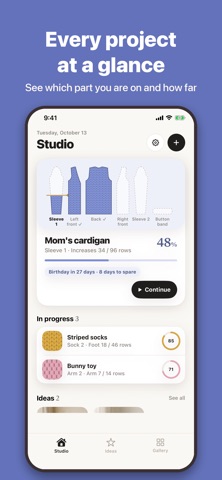


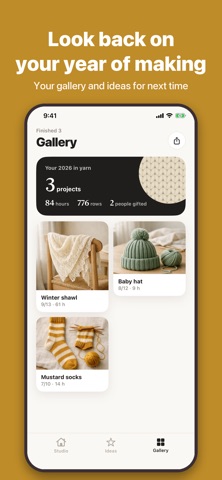
Woolnote is more than a row counter. It is a knitting notebook that carries your whole project with you.
Projects and parts
Choose from 12 kinds, such as sweater, cardigan, socks, hat, scarf or toy, and the parts you need and a finishing list are filled in for you.
Sweaters and cardigans can be knit in pieces and seamed, or top down in one piece.
The parts map on the project screen fills with knitted fabric as you go.
Step plans
Plan each part in steps, such as ribbing, increases or keeping the pattern.
Choose fixed rows, knit to a length, pattern repeats, increases and decreases, or an open step.
Write something like increase 2 stitches every 6 rows, 8 times, and Woolnote works out those rows and your stitch count.
The counter
Tap once each time you finish a row, and the fabric under the needle grows by one row.
What to do this row and your current stitch count are shown alongside.
Tapped by mistake? Undo the row. The time you spend is recorded while you count.
Staying on plan
Based on your pace over the last two weeks, Woolnote shows when you are likely to finish and whether you are ahead of your target date.
Add gauge and yarn details to get an estimate of how much more yarn you need.
Finish the first sleeve, and the second one picks up the rows you actually knit.
Finishing and sharing
Tick off a finishing list such as weaving in ends, blocking and sewing on buttons.
When you finish, make a completion card with photos and numbers, a handmade label for gifts, and a card of progress photos to share.
Look back on the projects of your year in the gallery, and keep ideas for what to knit next.
Pattern viewer
Add a pattern PDF or photo you own to a project and open it right from the counter.
Woolnote does not provide patterns. The patterns you add never leave your device.
Good to know
No account is needed and your projects are stored only on this device. You can create a backup file in Settings and restore it later.
The app shows ads. Your projects and patterns are not used for ads.
Available in English, Korean, Japanese, Chinese, Spanish, French, German and Italian.
More apps from the same developer
MarkTrail: Korea Travel Stamps Catendar: Shift Work Calendar TypeDay: Daily MBTI Fortune Field Master: Measure & Level Flosome: Grow Mystery Flowers Scenevie: Film Photo Diary Pointalk: Communication Board Starhush: Calm Constellations Mochi Clash: Cute Party Battle IdleCrawler: Idle Dungeon RPG Carestamp: BP & Sugar Notebook